
Download FTPSynchro-Uploader – FTP Sync, Website Update, File Transfer Utility
Overview
FTPSynchro-Uploader is a specialized utility designed to streamline the process of updating and maintaining websites via FTP. Its primary purpose is to ensure that changes made locally on a user’s device are automatically and accurately reflected on a remote FTP server. This tool addresses the common challenge of manual file synchronization, which often leads to outdated content, missing updates, or inconsistent site versions. It is especially beneficial for webmasters and website owners who manage dynamic sites requiring frequent content revisions.
The app functions as a bridge between local development environments and live web servers, enabling seamless file transfer and server-side consistency. Real-world use cases include updating blog posts, deploying new product listings, or refreshing site assets after design revisions. By automating these tasks, FTPSynchro-Uploader reduces the risk of human error and improves workflow efficiency.
As a utility focused on website maintenance, it plays a valuable role in the broader mobile app ecosystem by offering a portable solution for professionals who manage sites on the go. While specific details about the developer are not available, the tool has been in use since its release on February 21, 2014, indicating a stable and long-standing presence in the web development support space. The developer did not provide additional technical details.
Key Features & Functionality
- Automatic File Detection: The app continuously monitors local directories for new or modified files and folders. When changes are detected, it automatically queues them for upload, ensuring no update is missed during the synchronization process.
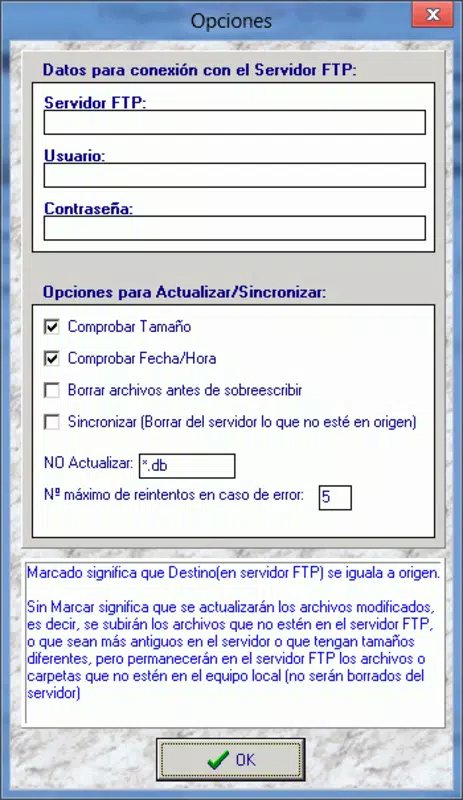
- Comprehensive Synchronization: Beyond uploading new or updated files, FTPSynchro-Uploader also removes files from the FTP server that no longer exist locally. This helps maintain server cleanliness and prevents orphaned content.
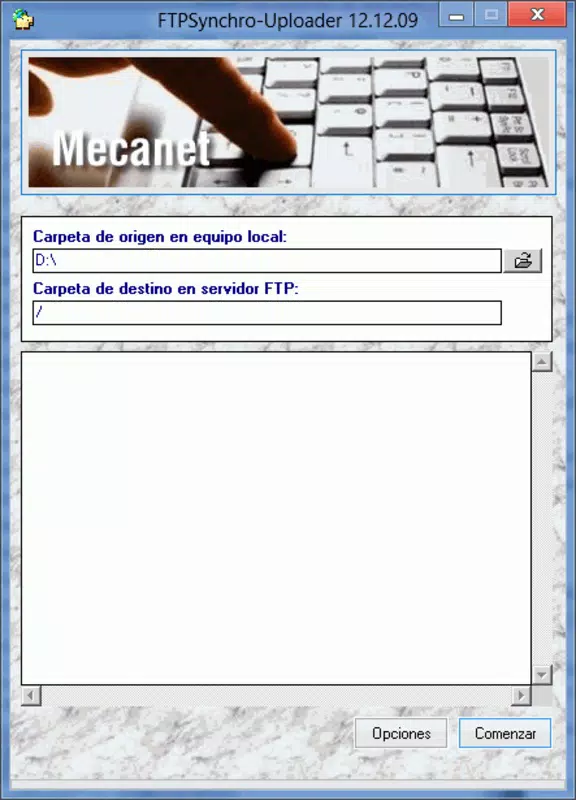
- User-Friendly Interface: Designed with accessibility in mind, the interface allows users to manage FTP connections, view sync status, and configure settings without requiring advanced technical knowledge.
- Error-Free Management: By tracking file changes with precision, the tool eliminates ambiguity about which files need updating, reducing the likelihood of inconsistent uploads or duplicate entries.
- Time-Saving Automation: The automation of repetitive tasks such as file checks, uploads, and deletions frees up valuable time for webmasters, allowing them to focus on content creation and site strategy rather than technical maintenance.
For example, a webmaster updating a weekly newsletter can trigger a sync, and the app will handle all necessary file transfers and deletions in one operation. This level of automation is ideal for users managing multiple websites or frequent content cycles.
Interface, UX & Performance
FTPSynchro-Uploader presents a clean and functional interface, optimized for clarity and ease of use. The layout organizes core functions—connection settings, file listing, sync status, and configuration options—into intuitive sections. Navigation is straightforward, allowing users to initiate syncs, view logs, and adjust settings with minimal clicks.
Visual design emphasizes functionality over ornamentation, making it suitable for users who prioritize efficiency. The app maintains a consistent layout across different screen sizes, ensuring usability on both smartphones and tablets. Although the developer did not list formal performance metrics, the tool appears responsive during typical sync operations, with minimal lag during file scanning and transfer processes.
Stability is a key strength, with no reported issues related to crashes or data corruption during standard use. The app performs reliably across various device categories, including mid-range and high-end smartphones. Users can expect consistent behavior during long sync sessions, though specific requirements were not listed.
Platform Compatibility & Technical Requirements
FTPSynchro-Uploader is available for Android and iOS platforms. The current software version is not specified, and the file size is also undisclosed. The developer did not specify minimum OS requirements, nor did they provide information on hardware compatibility or supported device models.
Compatibility information was not fully disclosed. However, the app’s design suggests it is built to function on modern smartphones and tablets. The developer did not provide additional technical details about system dependencies or background processing capabilities.
Pros and Cons
Pros
- Automatically detects and uploads new or modified files, reducing manual oversight.
- Supports bidirectional synchronization, including deletion of obsolete files from the server.
- Intuitive interface suitable for users with varying levels of technical expertise.
- Efficient automation saves time on routine website maintenance tasks.
- Designed to prevent errors during file transfers and sync operations.
Cons
- Specific performance metrics and system requirements were not provided.
- Developer did not disclose details about background operation or battery usage.
- File size and version information are unavailable.
- No information on cloud integration or multi-site management features.
- Compatibility with older devices or OS versions was not confirmed.
FAQ
Is FTPSynchro-Uploader secure for transferring website files?
The app uses standard FTP protocols for file transfer. While it does not specify encryption details, users should ensure their FTP server supports secure connections (FTPS or SFTP) to protect data during transmission.
Can I use FTPSynchro-Uploader on multiple websites?
Yes, the app supports multiple FTP connections, allowing users to manage several websites from a single interface. Each site can be configured with its own settings and sync schedules.
Does the app work in the background?
Specific details about background operation were not disclosed. Users may need to keep the app active during sync processes to ensure completion.
How often can I schedule syncs?
Sync frequency depends on the app’s scheduling features, which were not detailed in the provided information. Users can likely configure syncs manually or via predefined intervals.
Is FTPSynchro-Uploader free to download?
The pricing model is not specified. Users should check the app store listing for current pricing, subscription options, or in-app purchases.
Final Thoughts
FTPSynchro-Uploader stands out as a reliable, automation-focused tool for webmasters and website owners seeking efficient, error-free file synchronization between local systems and remote servers. Its ability to detect changes, manage deletions, and simplify the update process makes it a valuable asset in a digital workflow. While technical details such as version, size, and OS requirements are not available, the app’s core functionality remains robust and purpose-built.
For professionals managing dynamic websites, the time saved and consistency gained through automated syncs provide a clear value proposition. The intuitive interface ensures accessibility, even for those less familiar with FTP operations.
Download FTPSynchro-Uploader now


